Use the instructions below to set up Direct Debit to pay your company contributions.
1 .Sign in to your Smart Pension account and select the Menu icon in the top right-hand corner
2. Select Company Details from the menu, then select the Direct Debits page
3. Select Add new mandate. This will redirect you to a secure service where you can fill in your payment details (see example below).
4. Fill in your payment details
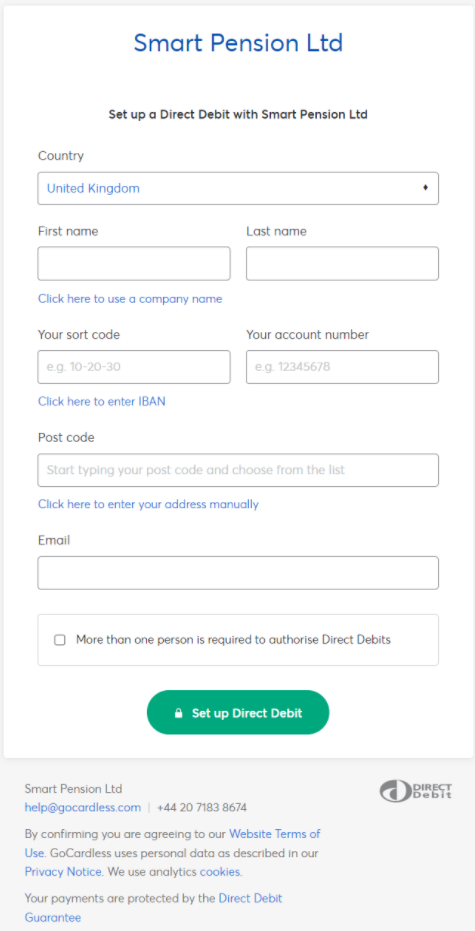
5. To finish setting up your Direct Debit, select the green Set up Direct Debit button and then Confirm
What payments we accept
We only accept payments via Direct Debit, from bank accounts based in the UK and denominated in Pounds Sterling (GBP). We cannot accept payments for pension contributions via BACS or in currencies other than GBP.
Choose when you pay contributions
Our pay now feature means you can pay monthly pension contributions at any point in the month. Learn more about choosing when to pay contributions
Lorem ipsum dolor sit amet elit
Lorem ipsum dolor sit amet, consectetur adipiscing elit, sed do eiusmod tempor incididunt ut labore et dolore magna aliqua. Ut enim ad minim veniam, quis nostrud exercitation ullamco laboris nisi ut aliquip ex ea commodo consequat. Duis aute irure dolor in reprehenderit in voluptate velit esse cillum dolore eu fugiat nulla pariatur.