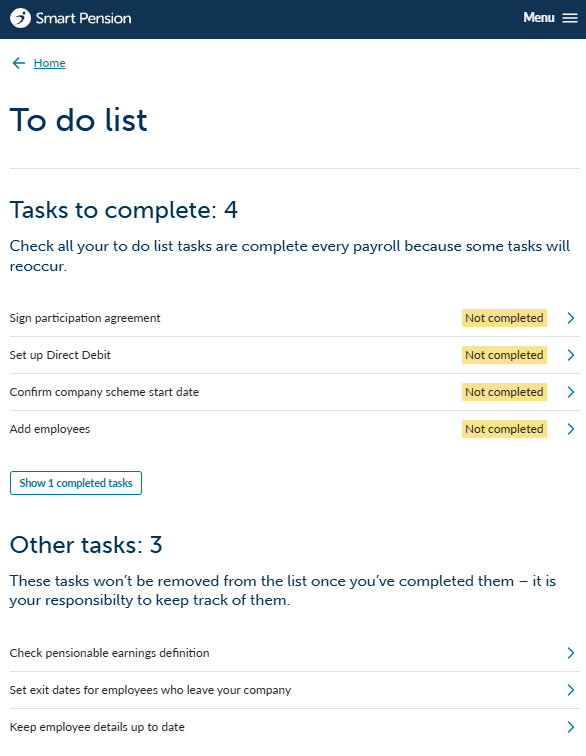
Each company account has a To Do list. Some of which are required to finish setting up the scheme and some are ongoing tasks.
Understanding each task
1 - Sign participation agreement
This is the Participation Agreement, the legal agreement between the company and Smart Pension. We will have created an e-document that needs to be electronically signed by the signatory (typically the director or directors of the business).
2 - Set up direct debit
This is a simple online form to add your company bank details so that we can deduct your pension contributions. Click here for more details on how to set up your direct debit.
3 - Confirm company scheme start date
We need to know your staging date so we can start your scheme from this date. You should have received a letter from the pension regulator with this date or you can look it up in our account by typing in your PAYE reference. Click here to find out more about your staging date.
4 - Add employees
Depending on how you want to assess your employees, this last step may not be required.
If you want to use Smart Pension to assess your employees and calculate their pension contributions then you need to add your employees here. However, if you are using your own payroll application to assess your employees then you can skip this step as your employee accounts will be created when you upload your first payroll file. Learn more about adding employees to your scheme or find out more about setting up your payroll application.
Other tasks
1 - Check pensionable earnings definition
The default definition for pensionable earnings is unbanded, however this can be changed if required. Find out more about pensionable earnings.
2 - Set exit dates for employees who leave your company
This will be an ongoing reminder to set exit dates when an employee leaves your company.
3 - Keep employee details up to date
This is another ongoing reminder to keep your employee personal details up to date.
Next steps
Once you have completed these tasks, you may wish to review the Scheme Setup options. These are optional settings that allow the administrator to create scheme wide rules such as automatic postponement.
Lorem ipsum dolor sit amet elit
Lorem ipsum dolor sit amet, consectetur adipiscing elit, sed do eiusmod tempor incididunt ut labore et dolore magna aliqua. Ut enim ad minim veniam, quis nostrud exercitation ullamco laboris nisi ut aliquip ex ea commodo consequat. Duis aute irure dolor in reprehenderit in voluptate velit esse cillum dolore eu fugiat nulla pariatur.