If you haven't signed in to Smart Pension before, head to Signing in to your member account for the first time to find out how to sign in and activate your account.
To sign in once you've activated your account, you'll need:
- your username (this is usually your email address)
- your password
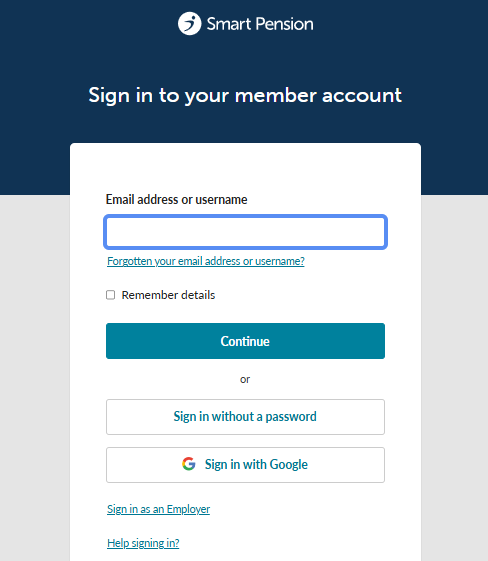
Member sign in - single employer account
A member with a single account is required to input their email address and password to log in successfully.
Alternatively, if you have already set your account up and haven’t changed your details, you can sign in without a password by clicking on the Sign in without a password button.
After clicking this button you will receive an email with a secure link that will take you to your account. Please refer to the video at the end of this article for more details.
Member sign in - Multiple employer accounts
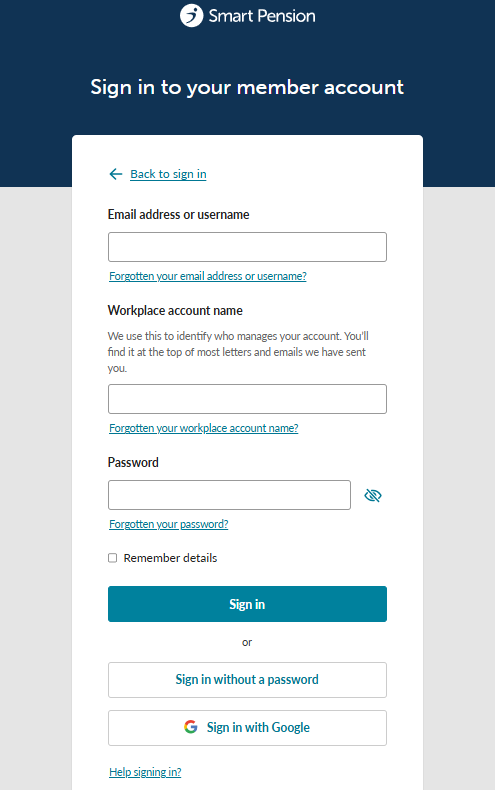
For a member with multiple accounts to sign in successfully, they're required to input their:
- email address
- workplace account name
- password
Alternatively, if you have already set your account up and haven’t changed your details, you can sign in without a password or workplace account name by clicking on the ‘Sign in without a password’ button.
After clicking this button you will receive an email with a secure link that will take you to your account. Please refer to the video at the end of this article for more details.
Need further help?
Please visit our designated member support article for signing into your account for the first time.
You can also refer to the video below, created to walk you through signing into your member account.
Related articles
Lorem ipsum dolor sit amet elit
Lorem ipsum dolor sit amet, consectetur adipiscing elit, sed do eiusmod tempor incididunt ut labore et dolore magna aliqua. Ut enim ad minim veniam, quis nostrud exercitation ullamco laboris nisi ut aliquip ex ea commodo consequat. Duis aute irure dolor in reprehenderit in voluptate velit esse cillum dolore eu fugiat nulla pariatur.